
new
Settings
Calendar
Reporting
New Series & Views: Neighborhood Prices & Pacing 👀

TL;DR →
- Two new pre-built System Viewsare now available in your pricing chart:Distribution PreviewandNeighborhood (Aggregate)
- These views surface 5 new "In Context" data series— spanning neighborhood pricing and booking pace — pre-assembled so the most useful combinations are ready to go
- The Distribution Previewlets you compare your final all-in (Rent + Fees) pricing directly against your neighborhood's posted rates
- The Neighborhood (Aggregate)view shows your neighborhood prices and introducesExpected vs. Observed Bookings— the easiest way to see if any date in your area is pacing ahead or behind
- The Expected vs. Observed Bookings series updates daily
- 📽️ 1-minute demo here
----------
📡 5 New "In Context" Series
You now have 5 new data series available on any listing's pricing chart.
These series are designed to help you understand your neighborhood's prices and booking pace:
- Neighborhood Median
- Neighborhood 25th–75th Percentile
- Expected Bookings
- Expected Bookings Range
- Observed Bookings
All booking series — Expected, Observed, and their range — are based on bookings in your listing's neighborhood.
We've pre-assembled these series into two new views so you can get to the signal instantly.
----------
🏘️ New View #1: Neighborhood (Aggregate)
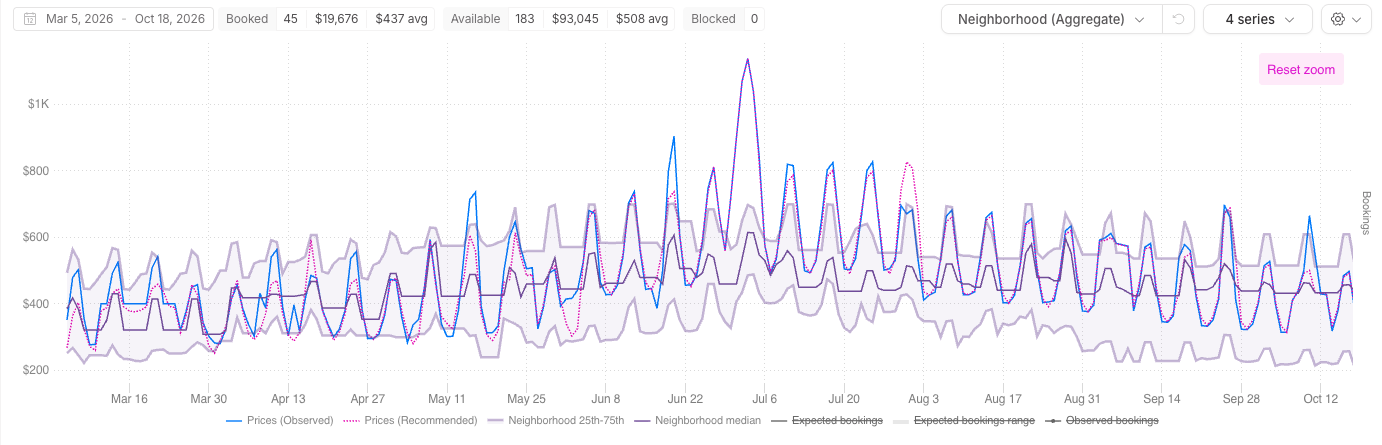
From any listing's pricing chart, you can now open the
Neighborhood (Aggregate)
view.This view includes your standard series:
- Prices (Recommended)
- Prices (Observed)
Plus all 5 new series:
- Neighborhood Median
- Neighborhood 25th–75th Percentile
- Expected Bookings
- Expected Bookings Range
- Observed Bookings
Here's what that unlocks in practice.
Let's say it's early April and you're watching a holiday weekend in late May. The
Observed Bookings
line is already running well above Expected
— your neighborhood is booking faster than the model predicted. That's a strong, data-backed signal that demand is spiking earlier than usual, giving you a concrete reason to be more aggressive on price now, before inventory tightens.The inverse is equally useful: when Observed is lagging Expected, you have early visibility that pace is soft — and you can adjust strategy before it shows up in your own availability numbers.
This is the kind of signal that used to require piecing together comp data manually or waiting for a market report. Now it's right in your chart, and it
updates daily
.To use it:
- Open any listing's pricing chart
- Select Neighborhood (Aggregate)from the Views dropdown
- Your neighborhood pricing and pacing data will load instantly
----------
💸 New View #2: Distribution Preview
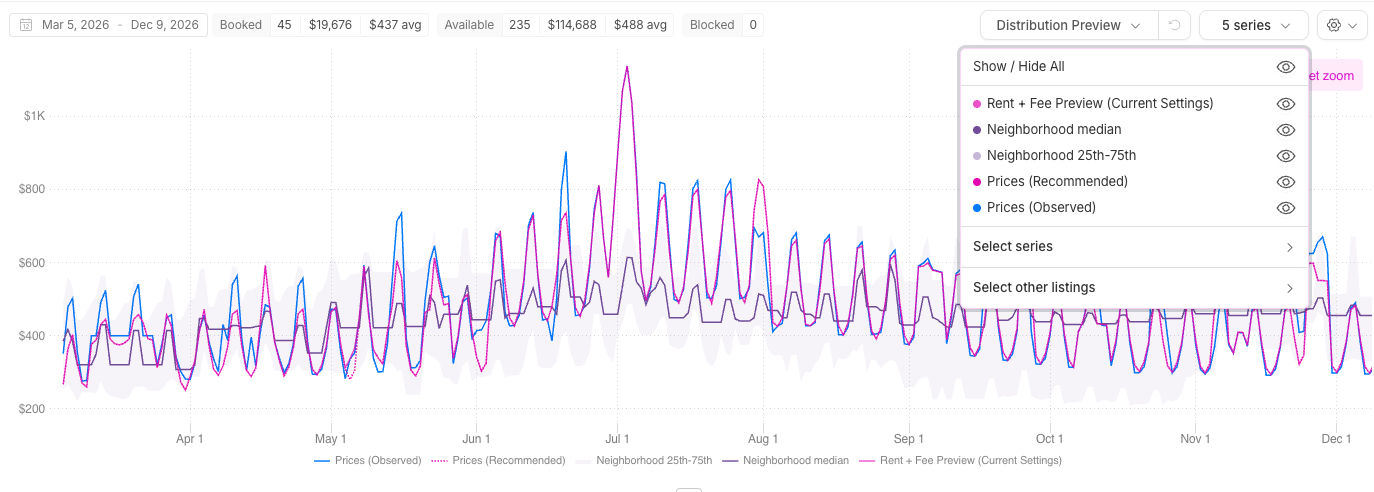
The
Distribution Preview
is purpose-built for one of the most important (and tricky) questions in modern STR pricing: what does my guest actually pay, and how does that compare to my neighbors?Because fees vary by season, booking size, stay length, and channel, your "rent" price alone doesn't tell the whole story. This view brings it all together:
- Rent + Fee Preview
- Prices (Recommended)
- Prices (Current Settings)
- Prices (Observed)
- Neighborhood Median
- Neighborhood 25th–75th Percentile
This should help you see exactly how your
posted rates
compare to your neighbors' posted rates.
To use it:
- Open any listing's pricing chart
- SelectDistribution Previewfrom the Views dropdown
- Your all-in pricing and neighborhood range will load instantly
🥳 Pro Tip!
The
Distribution Preview
is most powerful once your Rent + Fee Preview
is configured. Head to your listing's Settings → Rent + Fee Preview to confirm your fee load — or toggle on auto-detection so Wheelhouse keeps it current as your fee structure evolves.